JavaServices
This tutorial explains how to develop JavaService classes which can be easily embedded into a Jolie service. For the sake of clarity, here we consider to use Netbeans IDE as a project management tool, but the following instructions can be easily adapted to any kind of Java IDE.
The tutorial also presents some features of Java integration in Jolie, i.e., manipulating Jolie values in Java, calling operations from a Java service, and the dynamic embedding of JavaServices.
Creation of a JavaService project
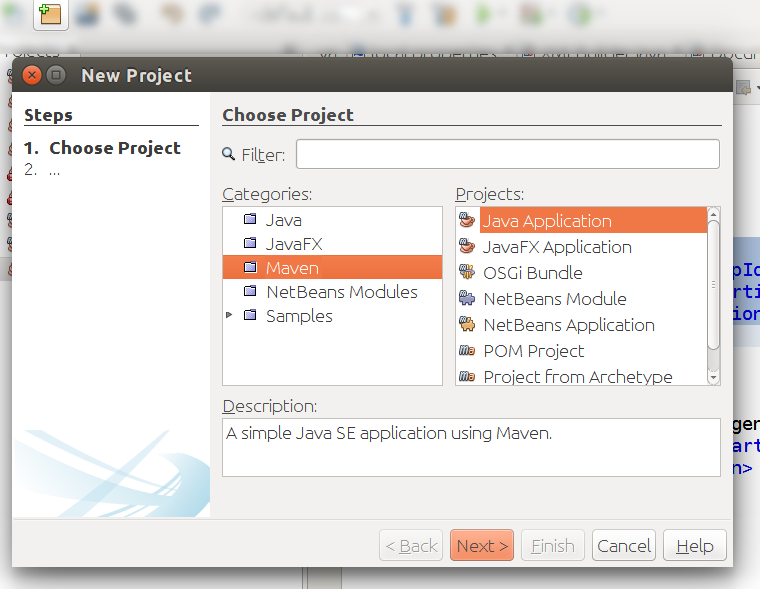
- If you are using Maven, just click on “New Project” icon and then select Maven -> Java Application as reported in the following picture.
- If you are creating a new project from scratch click on “New Project” icon and then select Java -> Java Class Library
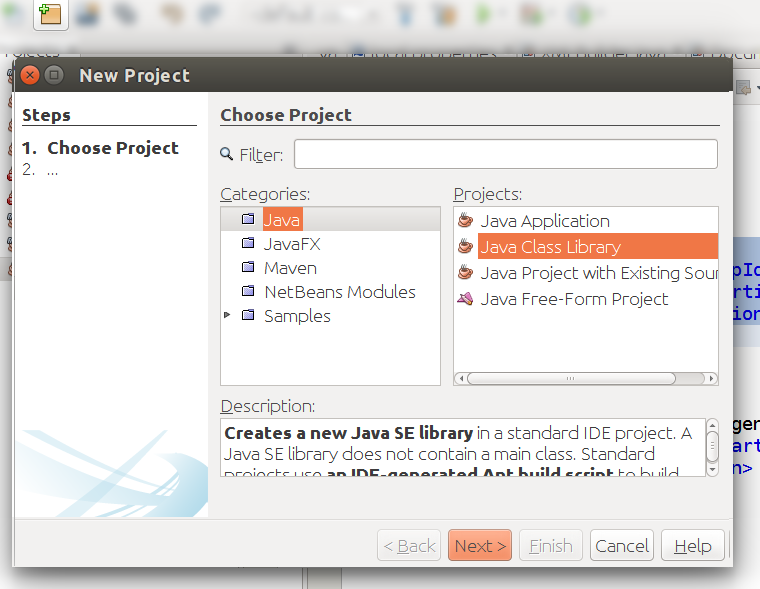
Then, follows the instructions and give a name to the project (ex:
FirstJavaService) and define the working directory.
Dependencies
Before continuing with the development of a JavaService keep in mind
that there is a dependency you need to add to your project to
properly compile the JavaService code: the jar jolie.jar which comes
with your Jolie installation. Follow these instructions to
prepare the file to be imported into your project:
Locate the
jolie.jarfile into your system: Jolie is usually installed into/usr/lib/joliefolder for linux like operating systems and inC:\Joliefor Windows operating systems. In the installation folder of Jolie you can find the filejolie.jar. If you are not able to locate thejolie.jarfile or you require some other Jolie versions, here you can find the complete list of all the available releases of Jolie. Download the release you need.If you use Maven you could register the dependency in your local repo by using the following command
mvn install:install-file -Dfile=<path-to-jolie.jar>/jolie.jar -DgroupId=jolie -DartifactId=jolie -Dversion=<version> -Dpackaging=jar
NOTE We are working to register the dependency jolie.jar into Maven Central. If jolie.jar is available into Maven Central the step above can be skipped.
Importing the Jolie dependency into your JavaService project
If you use Maven it is very easy to import the Jolie dependency into
your project, just add the following dependency into your pom.xml file:
<dependency>
    <groupId>jolie</groupId>
    <artifactId>jolie</artifactId>
    <version>1.6.2</version>
</dependency>
If you manually manage your project just add the jolie.jar as an
external dependency. In Netbeans you have to:
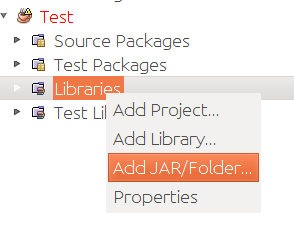
- Expand your project
- Right mouse button on Libraries
- Select Add JAR/Folder
- Select the
jolie.jarfile from the path selector
The first JavaService
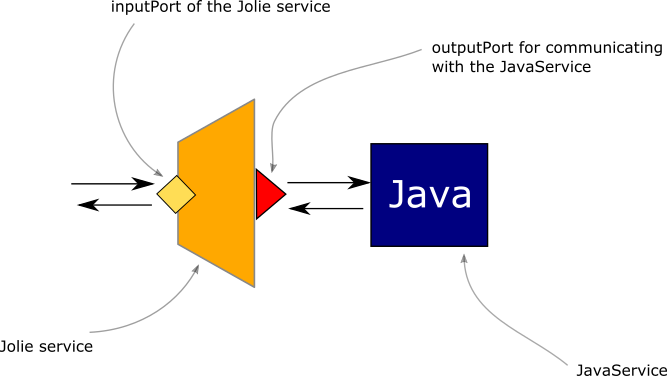
As a first example of a JavaService we present a sample scenario where we suppose to extend the features of a Jolie service by exploiting native Java computation. The architecture of the final system will look as it is represented in the following picture:
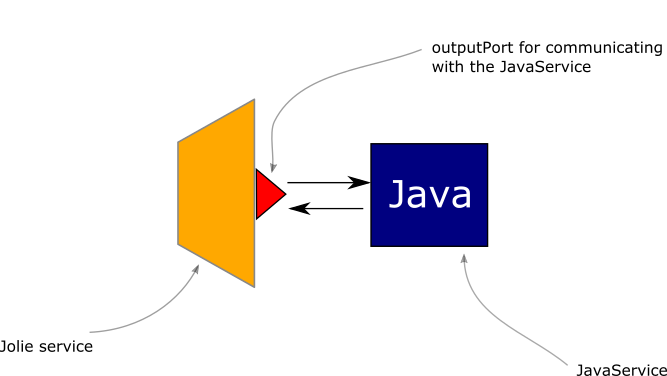
As it is possible to note, here the Jolie service communicates with the JavaService with a synchronous call equivalent to a RequestResponse.
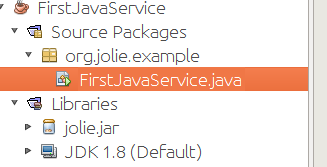
Before writing the actual code of the JavaService it is important to
create the package which will contain it. Let us name it org.jolie.example. Then,
let us create the new Java file called FirstJavaService.java.
Writing the JavaService code
Here we present the code of our first JavaService which simply prints out
on the console a message received from an invoker and then reply with
the message I am your father.
package org.jolie.example;

import Jolie.runtime.JavaService;
import Jolie.runtime.Value;

public class FirstJavaService extends JavaService
{
    public Value HelloWorld( Value request ) {
        String message = request.getFirstChild( "message" ).strValue();
        System.out.println( message );
        Value response = Value.create();
        response.getFirstChild( "reply" ).setValue( "I am your father" );
        return response;
    }
}
In the code there are some important aspects to be considered:
- We need to import two classes from the Jolie dependency:
jolie.runtime.JavaServiceandjolie.runtime.Value - the class
FirstJavaServicemust be extended as a JavaService:... extends JavaService - the request parameter and the response one are objects
Value - it is possible to navigate the tree of a
Valueby using specific methods likegetFirstChild(see below) - the request message has a subnode
messagewhich contains a string - the response message will contain the reply message in the subnode
reply - the core logic of the JavaService is just the line
System.out.println("message")which prints out the content of the variable message on the console
Building the JavaService
Now we can build the JavaService, in particular we need to create a
resulting jar file to be imported into the corresponding Jolie
project. To do this, just click with the mouse right button on
the project and select Clean and Build.
If you are managing the project with Maven you will find the resulting jar in folder target, whereas if you are manually managing the project you can find it in the folder dist.
Executing the JavaService
Now we are ready for embedding the JavaService into a Jolie service. It is very simple, just follow these steps:
- Create a folder where placing your Jolie files, ex:
JolieJavaServiceExample - Create a subfolder named
lib(JolieJavaServiceExample/lib) - Copy the jar file of your JavaService into the folder
lib(jolie automatically imports all the libraries contained in the subfolderlib) - Create a Jolie interface file where defining all the available
operations of your JavaService and name it
FirstJavaServiceInterface.iol. It is worth noting that all the public methods defined in the class FirstJavaService can be promoted as operations at the level of a Jolie service. In our example the interface is calledFirstJavaServiceInterfaceand it declares one operation calledHelloWorld(the name of the operation must be the same name of the corresponding operation in the JavaService). The request and response message types define two messages where the former has a subnode namedmessageand the latter is namedreply.
type HelloWorldRequest: void {
  .message: string
}

type HelloWorldResponse: void {
  .reply: string
}

interface FirstJavaServiceInterface {
  RequestResponse:
    HelloWorld( HelloWorldRequest )( HelloWorldResponse )
}
- In the code of your Jolie service, create an outputPort for your
JavaService specifically addressed for operating with it. You can
name the outputPort as you prefer (there are no restrictions), in
this example we use the name
FirstJavaService. Remember to join the JavaService interface in the outputPort declaration as we did in this example:
outputPort FirstJavaServiceOutputPort {
  Interfaces: FirstJavaServiceInterface
}
- Embed the JavaService by joining it with its outputPort
include "FirstJavaServiceInterface.iol"

outputPort FirstJavaServiceOutputPort {
  Interfaces: FirstJavaServiceInterface
}

embedded {
  Java:
    "org.jolie.example.FirstJavaService" in FirstJavaServiceOutputPort
}
- Complete your Jolie code.
Here we report a complete example of a Jolie code which calls the
JavaService and prints out its response on the console. Save it in a
file named main.ol. Note that the embedded construct takes as a type
the keyword Java instead of Jolie because we are embedding a
JavaService. As parameter the embedded construct takes the absolute
class name obtained as package/name+class/name.
include "console.iol"

include "FirstJavaServiceInterface.iol"

outputPort FirstJavaServiceOutputPort {
  Interfaces: FirstJavaServiceInterface
}

embedded {
  Java:
    "org.jolie.example.FirstJavaService" in FirstJavaServiceOutputPort
}


main {
    request.message = "Hello world!";
    HelloWorld@FirstJavaServiceOutputPort( request )( response );
    println@Console( response.reply )()
}
At this point your Jolie working directory should look like the following one:
- your Jolie working directory
- lib
- FirstJavaService.jar
- FirstJavaServiceInterface.iol
- main.ol
- lib
You can run the Jolie program by using the simple command
jolie main.ol.
NOTE to avoid the creation of folder lib, it is possible
to link the dependency FirstJavaService.jar in the command line as it
follows: jolie -l <path-to-dependency>/FirstJavaService.jar main.ol.
In this way you are free to place the dependency where it is more
suitable for you.
Using the JavaService into a Jolie service
In the previous example we just wrote a Jolie program which exploits the JavaService FirstJavaService. Clearly, it is possible to exploit the same JavaService within a Jolie service by adding an inputPort to the previous program.
In the following case we present a possible solution where the operation
of the JavaService is exported to the inputPort by exploiting the same
interface FirstJavaServiceInterface with a new implementation of the
operation HelloWorld in the main scope of the service.
include "console.iol"

include "FirstJavaServiceInterface.iol"

outputPort FirstJavaServiceOutputPort {
  Interfaces: FirstJavaServiceInterface
}

embedded {
  Java:
    "org.jolie.example.FirstJavaService" in FirstJavaServiceOutputPort
}

execution{ concurrent }

inputPort MyInputPort {
  Location: "socket://localhost:9090"
  Protocol: sodep
  Interfaces: FirstJavaServiceInterface
}


main {
    HelloWorld( request )( response ) {
        println@Console("I am the embedder")();
        HelloWorld@FirstJavaServiceOutputPort( request )( response )
    }
}
Such a scenario is useful when we need to add some extra computation within the behaviour before invoking the JavaService (in the example we print out the request message before forwarding it to the JavaService). In those cases where there is no need to manipulate the messages in the behaviour, we could directly aggregate the JavaService outputPort in the inputPort of the service by obtaining a direct connection between the Jolie inputPort and the JavaService.
include "console.iol"

include "FirstJavaServiceInterface.iol"

outputPort FirstJavaServiceOutputPort {
  Interfaces: FirstJavaServiceInterface
}

embedded {
  Java:
    "org.jolie.example.FirstJavaService" in FirstJavaServiceOutputPort
}

execution{ concurrent }

inputPort MyInputPort {
  Location: "socket://localhost:9090"
  Protocol: sodep
  Aggregates: FirstJavaServiceOutputPort
}

main {
  ...
}
Manipulating Jolie values in Java
In this section we deepen the usage of the class Value which allows
for the management of Jolie value trees within Java.
Creating a value.
First of all, we need to create a Value in Java as we would do in Jolie.
The following Java code creates a Value named v.
Value v = Value.create();Getting the vector elements.
In each Jolie tree, a node is a vector. To access/get the
vector elements of a node, you can use the method
getChildren( String subnodeName ) which returns the corresponding
ValueVector of the subnode subnondeName. In the following example we
get all the vector elements of the subnode subnode1.
ValueVector vVector = v.getChildren("subnode1");All the items of a ValueVector are Value objects. To access the
Value element at index i it is possible to use the method
get( int index ). In the following example we access the third element
of the subnode subnode1 where 0 is the index of the first element.
ValueVector vVector = v.getChildren("subnode1");
Value thirdElement = vVector.get( 2 );
Setting the value of an element.
It is possible to use the method setValue( ... ) for setting the value
content of an element as in the following example:
ValueVector vVector = v.getChildren("subnode1");
Value thirdElement = vVector.get( 2 );
thirdElement.setValue("Millennium Falcon");
Getting the value of an element.
Once accessed a vector element (a value in general), it is possible to get its value by simply using one of the following methods depending on the type of the content:
strValue()intValue()longValue()boolValue()doubleValue()byteArrayValue().
In the following example we suppose to print out the content of the
third element of the subnode subnode1 supposing it is a string.
ValueVector vVector = v.getChildren("subnode1");
Value thirdElement = vVector.get( 2 );
thirdElement.setValue("Millennium Falcon");
System.out.println( thirdElement.strValue() );
Calling an operation of the embedder from the JavaService
A JavaService can be also programmed to call an operation of the embedder. A typical example of such a scenario is the case of a callback pattern between the embedder and the JavaService as reported in the picture below:
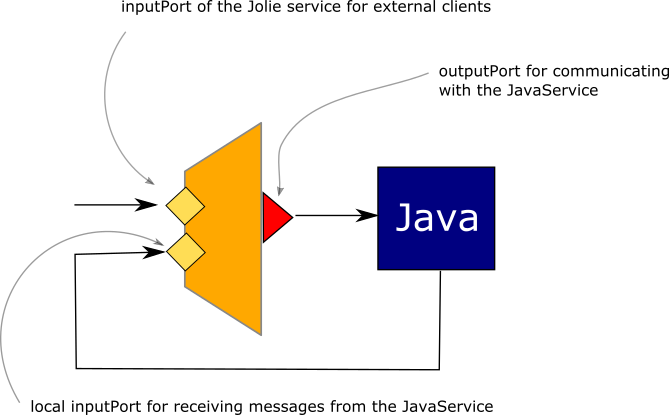
This can be done with the method sendMessage of the class
JavaService. As an example, we extend the previous JavaService by
introducing a new asynchronous method called AsynchHelloWorld which
receives a request with the same message of method HelloWorld and a
field sleep which specifies the number of millisecond to wait before
sending the reply. When Such a time-out has been introduced just for
simulating a delay in the response. When the sleeping time is finished
the method calls back the Jolie service on its operation reply.
package org.jolie.example;

import Jolie.net.CommMessage;
import Jolie.runtime.JavaService;
import Jolie.runtime.Value;

public class FirstJavaService extends JavaService
{
    public Value HelloWorld( Value request ) {
        String message = request.getFirstChild( "message" ).strValue();
        System.out.println( message );
        Value response = Value.create().getFirstChild( message );
        response.getFirstChild( "reply" ).setValue( "I am your father" );
        return response;
    }

    public void AsyncHelloWorld( Value request ) {
        String message = request.getFirstChild( "message" ).strValue();
        System.out.println( "async " + message );
        Value response = Value.create().getFirstChild( message );
        response.getFirstChild( "reply" ).setValue( "I am your father" );
        try {
            Thread.sleep( request.getFirstChild( "sleep" ).intValue() );
        } catch ( InterruptedException e ) {
            e.printStackTrace();
        }
        sendMessage( CommMessage.createRequest( "reply", "/", response ) );
    }
}
The class CommMessage (package Jolie.net) represents a Jolie
communication message which is sent to the embedder by means of the
JavaService method sendMessage. The method indeed requires a message
which is created by exploiting the static methods createRequest. In
this case, the message has been initialized with the following
parameters:
reply: the name of the operation of the embedder to call;/: the service path (see Redirection);response: a Value object that contains the data structure to send.
In this case, the message to send contains the same string of method
HelloWorld. It is worth noting that in this example the operation
reply is a OneWay operation but it is possible also to interact by
using a RequestResponse operation. The class CommMessage provides
different static methods for creating a request message and a response
message. Now let us comment how the FirstJavaServiceInterface must be
modified to be compliant with the new JavaService:
type AsyncHelloWorldRequest: void {
  .message: string
  .sleep: int
}

type HelloWorldRequest: void {
  .message: string
}

type HelloWorldResponse: void {
  .reply: string
}

interface FirstJavaServiceInterface {
  RequestResponse:
    HelloWorld( HelloWorldRequest )( HelloWorldResponse )
  OneWay:
    AsyncHelloWorld( AsyncHelloWorldRequest )
}
The new operation AsyncHelloWorld has been declared as a OneWay
operation and its message type contains two subnodes: message and
sleep. Note that in this case, the corresponding Java method
AsyncHelloWorld returns a void instead of a Value.
The embedder follows:
include "console.iol"

include "FirstJavaServiceInterface.iol"

interface LocalInterface {
OneWay:
  reply( HelloWorldResponse )
}

outputPort FirstJavaServiceOutputPort {
  Interfaces: FirstJavaServiceInterface
}

embedded {
  Java:
    "org.jolie.example.FirstJavaService" in FirstJavaServiceOutputPort
}

inputPort MyLocalPort {
  Location: "local"
  Interfaces: LocalInterface
}


main {
    request.message = "Hello world!";
    request.sleep = 3000;
    AsyncHelloWorld@FirstJavaServiceOutputPort( request );
    reply( response );
    println@Console( response.reply )()
}
The embedder must declare its own inputPort (here called
MyLocalPort) where it will receive messages from the JavaService. In
particular, on port MyLocalPort, the embedder exhibits a OneWay
operation called reply. In the main scope, the embedder calls the
JavaService by means of the operation AsyncHelloWorld and then waits for the reply message on the operation reply.
Annotations
Each public method programmed within a JavaService must be considered as
an input operation that can be invoked from the embedder. Depending on
the return object the method represents a OneWay operation or a
RequestResponse one. If the return type is void, the operation is
considered a OneWay operation, a RequestResponse operation otherwise.
You can override this behaviour by using the @RequestResponse annotation, which forces Jolie to consider the annotated method as a RequestResponse operation.
Using RequestResponse operations in JavaServices
So far, we have exploited only OneWay operations for making interactions between the JavaService and the embedder. Now, we present how to exploit also RequestResponse operations. In the example below there are both a RequestResponse invocation from the JavaService to the embedder and a RequestResponse invocation from the embedder to the JavaService. The Java code follows:
package org.jolie.example;
import Jolie.net.CommChannel;
import Jolie.net.CommMessage;
import Jolie.runtime.JavaService;
import Jolie.runtime.Value;
import Jolie.runtime.embedding.RequestResponse;

public class JavaServiceWithRequestResponseCall extends JavaService {

    public void start( Value msg ) {
        System.out.println( msg.getFirstChild( "message" ).strValue() );
        Value v = Value.create();
        v.getFirstChild( "message" ).setValue( "Hello world from the JavaService" );
        try {
            CommMessage request = CommMessage.createRequest( "initialize","/",v );
            CommMessage response = sendMessage( request ).
                recvResponseFor( request );
            System.out.println( response.value().strValue() );
            } catch ( Exception e ) {
                e.printStackTrace();
            }
        }
}
In this example, the JavaService exhibits a OneWay operation start
where it prints out the received message and then invokes the embedder
by means of the RequestResponse operation initialize. The
RequestResponse invocation is performed by means of the method
sendMessage where the string "Hello world from the JavaService" is
the message content. Since, we are calling a RequestResponse we must
synchronously wait for receiving the response message by means of the
methods recvResponseFor which returns the response message stored into
the variable response.
Faults
Faults are very important for defining a correct communication protocol between a JavaService and a Jolie service. Here we explain how managing both faults from the JavaService to the embedder Jolie service and vice-versa.
Sending a Fault from a Javaservice
Let us consider the FirstJavaService example where we call the method
HelloWorld of the JavaService. In particular, let us modify the Java
code to reply with a fault in case the incoming message is
wrong.
public Value HelloWorld( Value request ) throws FaultException {
        String message = request.getFirstChild( "message" ).strValue();
        System.out.println( message );
        if ( !message.equals( "I am Luke" ) ) {
            Value faultMessage = Value.create();
            faultMessage.getFirstChild( "msg" ).setValue( "I am not your father" );
            throw new FaultException( "WrongMessage", faultMessage );
        }
        Value response = Value.create().getFirstChild( message );
        response.getFirstChild( "reply" ).setValue( "I am your father" );
        return response;

    }
Note that the method HelloWorld throws an exception called
FaultException that comes from the jolie.runtime package. A simple
Java exception is not recognized by the Jolie interpreter as a
Fault, only those of FaultException type are. The creation of a
FaultException is very simple, the constructor can take one or two
parameters. The former one is always the name of the fault, whereas the
latter one, if present, contains the fault value tree (in the example a
message with a subnode msg). The fault value tree is a common object
of type Value. On the Jolie service side, there is nothing special but
the fault is managed as usual:
include "console.iol"

include "FirstJavaServiceInterface.iol"

interface LocalInterface {
OneWay:
  reply( HelloWorldResponse )
}

outputPort FirstJavaServiceOutputPort {
  Interfaces: FirstJavaServiceInterface
}

embedded {
  Java:
    "org.jolie.example.FirstJavaService" in FirstJavaServiceOutputPort
}

inputPort MyLocalPort {
  Location: "local"
  Interfaces: LocalInterface
}


main {
    install( WrongMessage => println@Console( main.WrongMessage.msg )() );

    request.message = "I am Obi";
    HelloWorld@FirstJavaServiceOutputPort( request )( response );
    println@Console( response.reply )()
}
Keep in mind to modify the FirstJavaServiceInterface by declaring the
fault WrongFault for the operation HelloWorld:
type AsyncHelloWorldRequest: void {
  .message: string
  .sleep: int
}

type HelloWorldRequest: void {
  .message: string
}

type HelloWorldResponse: void {
  .reply: string
}

type WrongMessageFaultType: void {
  .msg: string
}

interface FirstJavaServiceInterface {
  RequestResponse:
    HelloWorld( HelloWorldRequest )( HelloWorldResponse ) throws WrongMessage( WrongMessageFaultType )
  OneWay:
    AsyncHelloWorld( AsyncHelloWorldRequest )
}
Managing fault responses
In Jolie a RequestResponse message can return a fault message which must
be managed into the JavaService. Such a task is very easy and can be
achieved by checking if the response is a fault or not by exploiting
method isFault of the class CommMessage as reported in the following
code snippet:
CommMessage response = sendMessage( request ).recvResponseFor( request );
if ( response.isFault() ) {
    System.out.println( response.fault().faultName() );
} else {
    System.out.println( response.value().strValue() );
}
JavaService dynamic embedding
So far, we have discussed the possibility to statically embed a
JavaService. In this case the JavaService is shared among all the
sessions created by the embedder. In some cases, it could be particularly
suitable to embed an instance of JavaService for each running session of
the embedder. Such a task can be fulfilled by exploiting the dynamic
embedding functionality supplied by the Runtime of Jolie. In the
following example we present the Java code of a JavaService which simply
returns the value of a counter that is increased each time it is invoked
on its method start.
public class FourthJavaService extends JavaService {
    private int counter;

    public Value start( Value request ) {
        counter++;
        Value v = Value.create();
        v.setValue( counter ); return v;
    }
}
In the following code we report a classical embedding of this JavaService:
include "console.iol"

interface DynamicJavaServiceInterface {
  RequestResponse:
    start( void )( int )
}


execution{ concurrent }

outputPort DynamicJavaService {
  Interfaces: DynamicJavaServiceInterface
}

embedded {
  Java:
    "org.jolie.example.dynamicembedding.DynamicJavaService" in DynamicJavaService
}

inputPort MyInputPort {
  Location: "socket://localhost:9090"
  Protocol: sodep
  Interfaces: DynamicJavaServiceInterface
}


main {
    [ start( request )( response ) {
        start@DynamicJavaService()( response )
    }]
}
if we run a client that calls the service ten times as in the following code snippet:
for( i = 0, i < 10, i++ ) {
  start@Service()( counter );
  println@Console( counter )()
}
we obtain:
Received counter 1
Received counter 2
Received counter 3
Received counter 4
Received counter 5
Received counter 6
Received counter 7
Received counter 8
Received counter 9
Received counter 10
In this case the JavaService is shared among all the sessions and each new invocation will increase its inner counter.
Now let us see what happens if we dynamically embed it as reported in the following service:
include "console.iol"
include "runtime.iol"

interface DynamicJavaServiceInterface {
  RequestResponse:
    start( void )( int )
}

execution{ concurrent }

outputPort DynamicJavaService {
  Interfaces: DynamicJavaServiceInterface
}

inputPort MyInputPort {
  Location: "socket://localhost:9090"
  Protocol: sodep
  Interfaces: DynamicJavaServiceInterface
}


main {
    [ start( request )( response ) {
        with( emb ) {
          .filepath = "org.jolie.example.dynamicembedding.DynamicJavaService";
          .type = "Java"
        };
        loadEmbeddedService@Runtime( emb )( DynamicJavaService.location );
        start@DynamicJavaService()( response )
    }]
}
Note that we included runtime.iol to exploit
loadEmbeddedService@Runtime operation. Such an operation permits to
dynamically embed the JavaService in the context of the running session.
The operation returns the memory location which is directly bound in the
location DynamicJavaService.location that is the location of
outputPort DynamicJavaService.
Now, if we run the same client as in the example before, we obtain the following result:
Received counter 1
Received counter 1
Received counter 1
Received counter 1
Received counter 1
Received counter 1
Received counter 1
Received counter 1
Received counter 1
Received counter 1
Such a result means that for each session enabled on the embedder, a new JavaService object is instantiated and executed, thus the counter will start from zero every invocation.